Release Notes
TaskBookly v0.3.0 - release notes

Code
Happy fall!
This update includes lots of quality of life improvements, bug fixes, and new features.
Colors galore!
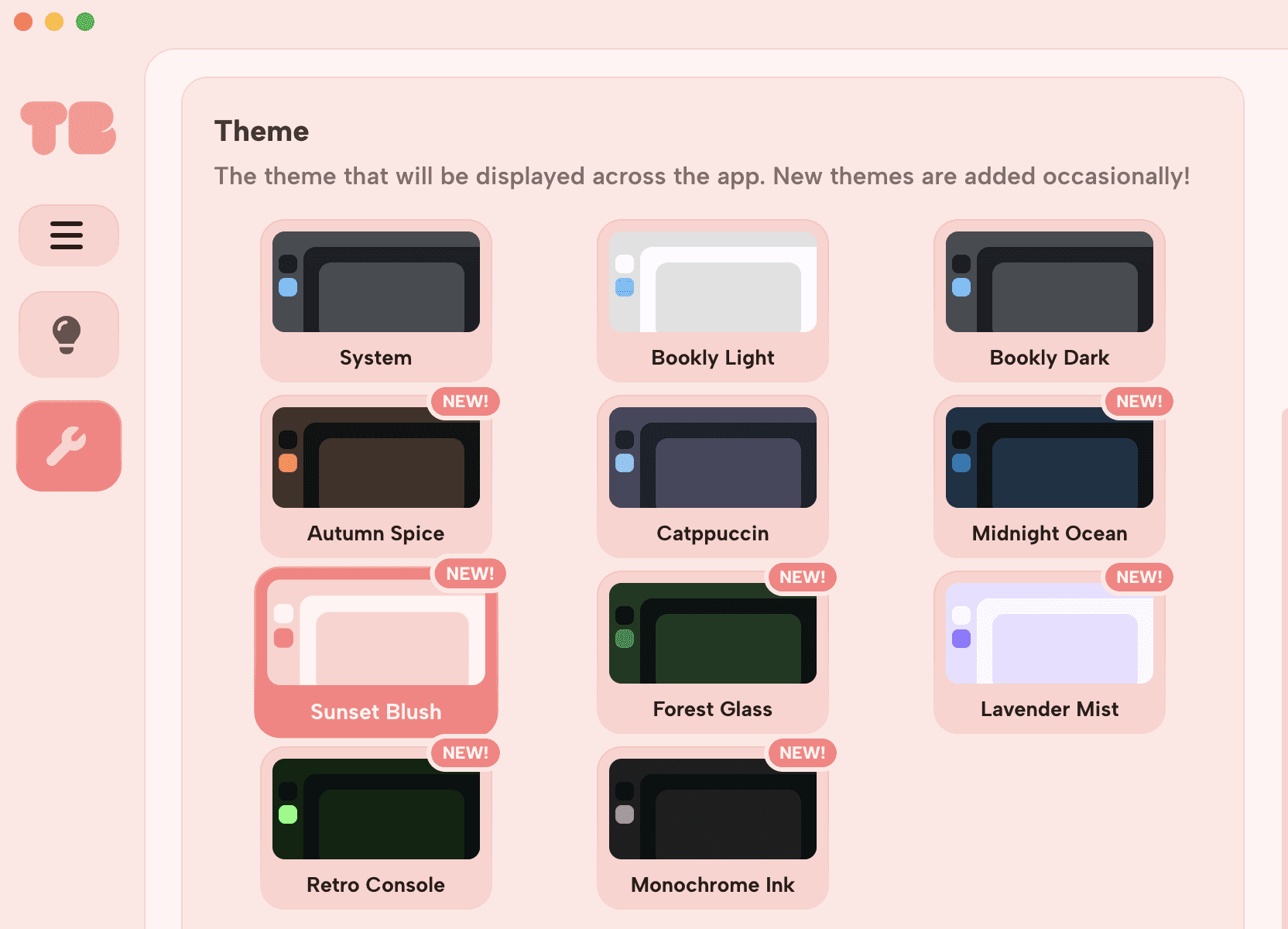
This update adds not one.. not two... but 7 new themes (5 dark and 2 light) to TaskBookly! In addition, a system theme option that will use your desired system theme instead, which is useful if you have it switch throughout the day.
New dark themes:
Autumn Spice
Midnight Ocean
Forest Glass
Retro Console
Monochrome Ink
New light themes:
Sunset Blush
Lavender Mist
Since now there are too many themes to choose from, it only makes sense that the theme picker should receive a glow-up. Now you'll see a cute little preview of each theme in a grid-view instead of the dreaded text-only selection menu that inhibited it before.
Sleek new typography and sharp icons
The last major update featured a complete overhaul to the old UI and color palettes. This time around, it's the fonts and icons. TaskBookly now uses Albert Sans and the Font Awesome 7 icon library for a much cleaner look.
Other changes
The sidebar will now automatically collapse when the window is small enough
Added the TaskBookly logo to the sidebar
Adjusted the height of the hamburger menu in the sidebar
Added an hourglass icon next to the charge cooldown text
Adjusted container header icon styling
Moved settings from the misc tab to general
Moved focus related settings into a new focus tab in settings
Renamed the Client tab in settings to About
Removed debug components from the about tab in settings
Added Electron and Chromium version info to the about tab in settings
Reorganized settings in the about tab
Added licensing info to the about tab in settings
The theme setting now defaults to
systemRenamed light and dark themes to 'Bookly Light' and 'Bookly Dark' respectively
Improved HTML semantics
Updated package dependencies
Bug fixes
Fixed alignment issues with dropdown menus
Fixed an issue that caused the glow around the break charge progress bar to not use the correct color palette
Fixed an issue where all processes would quit when closing the app, regardless of system preferences on macOS
Fixed an issue where the focus timer "Ending at" text wouldn't update while paused
Fixed an issue that caused the focus timer end time to cycle back and forth by intervals of 1
Fixed an issue where certain icons raw names did not communicate their connection properly to users using screen readers
Fixed an issue that caused notification sounds to play late when not cached
Code
Founder